

Definition:
The main difference between internet vs wifi is simple. The internet is the global network of connected computers and servers. WiFi is a wireless method that lets your devices access the internet without cables.
Many people use the terms internet and WiFi as if they mean the same thing. They do not. This confusion can cause problems when setting up a home network, fixing slow speeds, or choosing an internet plan. You may say, “My WiFi is down,” when the real issue is your internet service. Or you may think you need WiFi to use the internet, which is not always true.
Understanding internet vs wifi is important for daily life. It helps you stream videos, join online classes, play games, and work from home without trouble. It also helps you pick the right devices, routers, and plans for your needs. In simple terms, the internet is the worldwide network that connects millions of computers. WiFi is just one way to connect your phone, laptop, or TV to that network without wires.
This guide explains the difference in clear and easy language. You will learn definitions, advantages, disadvantages, examples, common mistakes, and exercises to test your knowledge.
Quick Answer or Overview
Internet vs wifi can be understood with one short idea.
- Internet is the global system that sends and receives data across the world.
- WiFi is the wireless technology that connects your device to the internet through a router.
Think of the internet as a huge road network across countries. WiFi is like the local road that connects your house to the highway.
Quick Comparison Table
| Feature | Internet | WiFi |
|---|---|---|
| What it is | Global network of networks | Wireless local network technology |
| Main purpose | Provides data access worldwide | Connects devices wirelessly |
| Requires ISP | Yes | Not always (can be local network only) |
| Needs router | Usually | Yes, for wireless access |
| Can work without each other | Internet can work with cable | WiFi can work without internet (local sharing) |
| Coverage | Worldwide | Limited range (home or office) |
Definition and Explanation of Internet vs WiFi
What Is the Internet
The internet is a massive system of connected networks. It links computers, servers, and data centers across the globe. When you open a website, send an email, or watch a video online, you are using the internet.
The internet uses protocols like TCP and IP to send data. It works through cables, satellites, and wireless signals. Internet access usually comes from an Internet Service Provider or ISP such as fiber, DSL, or mobile data companies.
What Is WiFi
WiFi is a wireless networking technology. It allows devices like smartphones, laptops, and smart TVs to connect to a local router without cables. The router then connects to the internet through a wired connection like fiber or broadband.
WiFi uses radio waves to transmit data within a short range. It is based on standards created by the IEEE and promoted by the Wi-Fi Alliance.
Visual Understanding of Internet vs WiFi
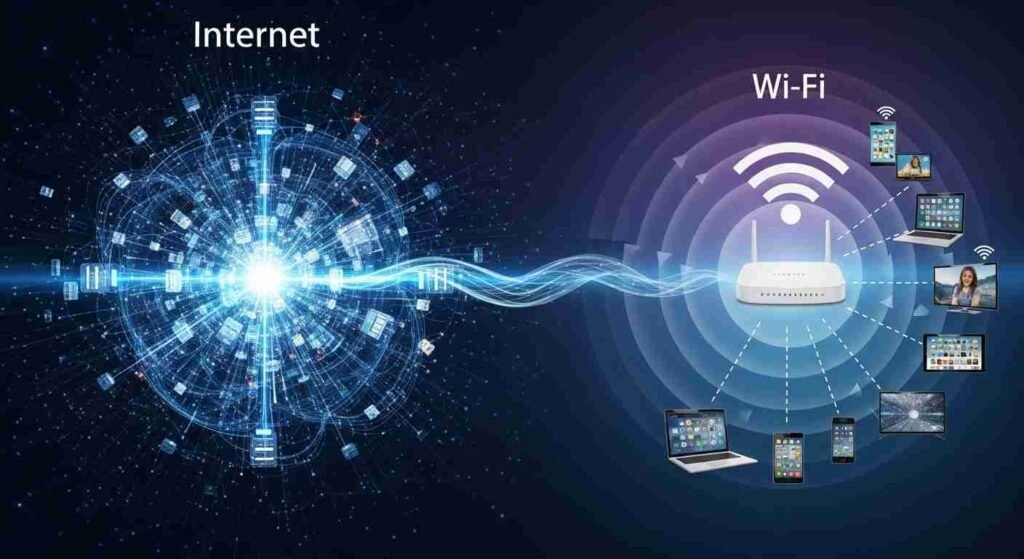
Internet vs WiFi Architecture

In the diagram above, the internet is shown as a large cloud network. The WiFi router acts as a bridge that lets devices connect wirelessly.
How Internet and WiFi Work Together
Internet and WiFi usually work as a team. Here is the basic process:
- Your ISP provides internet to your home through a cable.
- The cable connects to a modem or router.
- The router creates a WiFi network.
- Your phone or laptop connects to that WiFi.
- Data travels from your device → router → ISP → global internet.
This chain shows that WiFi is only a gateway to the internet. Without internet service, WiFi will still create a network but you cannot browse websites.
Advantages and Disadvantages of Internet vs WiFi
Advantages of the Internet
- Global access to information
- Enables email, streaming, and online work
- Supports cloud computing and apps
- Connects people worldwide instantly
Disadvantages of the Internet
- Needs ISP subscription
- Can have outages or slow speeds
- Security risks if not protected
- Depends on infrastructure like cables and satellites
Advantages of WiFi
- Wireless convenience
- Connects multiple devices at once
- Easy home and office setup
- No cables required for each device
Disadvantages of WiFi
- Limited range
- Signal interference from walls
- Security risks if open network
- Speed depends on router quality
Pros and Cons Table
| Aspect | Internet | WiFi |
|---|---|---|
| Mobility | Limited if wired | High mobility |
| Speed Stability | Stable with wired link | Can fluctuate |
| Security | Depends on network | Needs password protection |
| Cost | Monthly ISP cost | One-time router cost |
| Setup | Complex infrastructure | Easy home setup |
Real World Examples of Internet vs WiFi
Understanding internet vs wifi becomes easier with real-life examples.
Example 1: Home Internet Setup
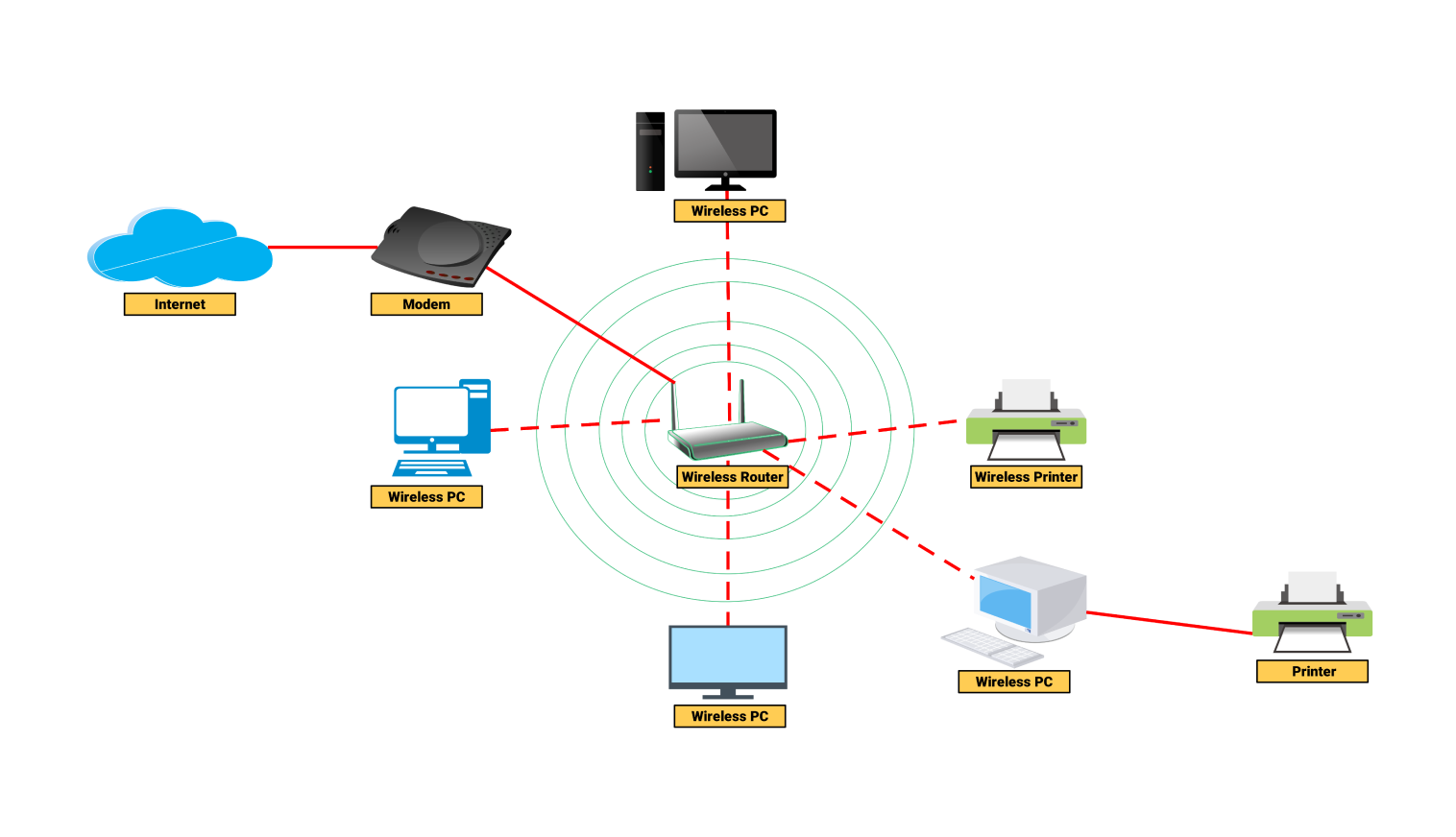
You buy a broadband plan from an ISP. A cable enters your home and connects to a router. The router creates WiFi signals. Your laptop connects wirelessly. Here, the internet is the service, and WiFi is the method of connection.
Example 2: Office Network
In an office, many computers use WiFi to connect to a central router. That router connects to the internet through fiber. Employees can access emails and cloud software.
Example 3: Public WiFi Without Internet
Sometimes, you connect to a café WiFi but cannot open websites. This happens when the WiFi network exists, but the internet service is down.
Example 4: Internet Without WiFi
If you connect a computer directly with an Ethernet cable to the modem, you can still use the internet without WiFi.
Real-Life Network Setup
4
Regional and Global Usage of Internet vs WiFi
The use of internet vs wifi differs across regions.
Developed Regions
In developed countries, high-speed fiber internet is common. Homes use advanced WiFi routers with mesh systems. People rely heavily on WiFi for streaming, smart homes, and remote work.
Developing Regions
In many developing areas, mobile internet is more common than home broadband. People often use WiFi hotspots from mobile routers or public places.
Rural vs Urban Access
- Urban areas: Fiber internet with strong WiFi coverage
- Rural areas: Limited internet, weak WiFi due to infrastructure gaps
Global organizations work to expand internet access worldwide, but WiFi coverage still depends on local hardware and electricity availability.
Common Mistakes When Comparing Internet vs WiFi
Many users mix up these terms. Here are common mistakes and corrections.
Mistake 1:
Correction: Check if your router is connected to the ISP.
Mistake 2:
Correction: WiFi is only a wireless connection method.
Mistake 3:
Correction: Speed also depends on ISP plan and bandwidth.
Mistake 4:
Correction: Ethernet cables can provide direct internet access.
Mistake 5:
Correction: Poor placement weakens WiFi even if internet speed is high.
Related Concepts and Comparisons
WiFi vs Ethernet
| Feature | WiFi | Ethernet |
|---|---|---|
| Connection type | Wireless | Wired |
| Speed stability | Variable | Very stable |
| Mobility | High | Low |
| Setup difficulty | Easy | Requires cables |
Internet vs Intranet
- Internet: Public global network
- Intranet: Private network inside an organization
WiFi vs Mobile Data
- WiFi: Uses router and broadband
- Mobile data: Uses cellular towers (4G/5G)
Deep Technical Understanding of Internet vs WiFi
Networking Layers
Internet communication uses multiple layers:
- Physical layer: cables and radio waves
- Data link layer: WiFi or Ethernet
- Network layer: IP addressing
- Transport layer: TCP and UDP protocols
WiFi operates mainly at the physical and data link layers. The internet functions at higher layers that manage global data routing.
Speed Factors
Internet speed depends on:
- ISP bandwidth plan
- Network congestion
- Server response time
- Backbone infrastructure
WiFi speed depends on:
- Router quality
- Distance from router
- Interference from walls
- Number of connected devices
Exercises with Answers
Exercise 1
Question: Is WiFi the same as the internet?
Answer: No. WiFi is a wireless method to connect to the internet.
Exercise 2
Question: Can you use the internet without WiFi?
Answer: Yes. You can use Ethernet cables or mobile data.
Exercise 3
Question: What device provides WiFi at home?
Answer: A wireless router provides WiFi signals.
Exercise 4
Question: Which one has global coverage: Internet or WiFi?
Answer: The internet has global coverage. WiFi has limited local range.
Exercise 5
Question: Why does WiFi work but internet does not?
Answer: Because the router is working but ISP service is down.
Advanced Use Cases and Professional Insights
Smart Homes
Smart homes rely heavily on WiFi for local communication. However, internet access allows remote control through cloud servers.
Businesses and Enterprises
Large companies use both wired internet backbone and enterprise WiFi systems. This ensures speed, reliability, and mobility.
Gaming and Streaming
Gamers often prefer Ethernet for stable internet. WiFi is convenient but may introduce latency if signal strength is weak.
IoT Devices
Internet of Things devices like smart cameras and sensors connect via WiFi but rely on internet servers to store and process data.
Security Considerations in Internet vs WiFi
Internet Security
- Firewalls protect data traffic
- Encryption protocols secure communication
- VPNs add privacy layers
WiFi Security
- Use strong passwords
- Enable WPA3 encryption
- Avoid public unsecured networks
Public WiFi can expose users to hacking if encryption is weak.
Troubleshooting Internet vs WiFi Issues
If Internet is Not Working
- Check ISP service status
- Restart modem
- Verify cables are connected
If WiFi is Weak
- Move closer to router
- Change router channel
- Use WiFi extenders or mesh systems
FAQs
Is internet vs wifi the same thing?
No. The internet is the global network, while WiFi is a wireless method to connect devices to that network.
Can WiFi work without internet?
Yes. WiFi can create a local network for file sharing even if the internet connection is unavailable.
Do I need WiFi to access the internet?
No. You can use Ethernet cables or mobile data instead of WiFi to access the internet.
Why is my WiFi connected but no internet access?
This usually means your router works but your ISP internet service is down or misconfigured.
Which is faster: internet or WiFi?
Internet speed depends on your ISP plan. WiFi speed depends on router strength and distance from the device.
Is mobile data considered internet or WiFi?
Mobile data is internet access provided through cellular networks, not WiFi technology.
Does turning off WiFi turn off the internet?
No. It only disables wireless access. Wired connections can still use the internet.
What causes slow internet vs wifi problems?
Slow speeds may result from weak WiFi signals, network congestion, or limited ISP bandwidth.
Can multiple devices share one internet connection through WiFi?
Yes. A router distributes one internet connection to many devices through WiFi.
Which is more secure: wired internet or WiFi?
Wired connections are usually more secure, while WiFi needs strong encryption and passwords.
Conclusion
Understanding internet vs wifi is essential for modern digital life. The internet is the global network that delivers information across the world. WiFi is simply a wireless bridge that connects your devices to that network. They work together but are not the same.
Knowing this difference helps you fix connection problems, choose the right internet plan, and improve network speed at home or office. If websites do not load, check your internet service first. If signal is weak, adjust your WiFi router placement. For stable performance, use wired Ethernet for heavy tasks and WiFi for mobility and convenience.
Professionally, businesses should combine strong broadband internet with high-quality WiFi infrastructure to support remote work, cloud apps, and IoT devices. At home, secure your WiFi with encryption and update router firmware regularly.
By clearly understanding internet vs wifi, you can make smarter decisions, solve technical issues quickly, and enjoy a smooth online experience every day.